ClickFix Attack Explained: How to Spot the Fake CAPTCHA Scam
By: Javid Amin | 18 October 2025
It Takes Five Seconds, and You Do All the Work
You open a website. A familiar box appears: “Verify you are human.” You tick it. Instead of a puzzle, a short set of instructions shows up. Press the Windows key and R. Press Ctrl+V. Press Enter. Done.
It feels like a slightly odd but harmless step. It isn’t. In those five seconds, you may have handed a stranger the keys to your email, your bank logins, your crypto wallet and your photos.
This is the ClickFix attack, and cybersecurity teams across universities, national response agencies and big technology companies have spent the past year warning about it. The scary part is that nothing gets “hacked” in the usual sense. There is no virus attachment, no suspicious download. The victim runs the malicious command themselves, believing they are fixing a problem.
Here is how the scam works, why it keeps fooling smart people, and what to do if you have already fallen for it.
What Is a ClickFix Attack?
ClickFix is a social engineering technique. Instead of breaking into your device, the attacker persuades you to break in for them.
The scammer builds a convincing page that pretends something is wrong or needs checking: a CAPTCHA, a browser error, a Windows alert, a failed video-meeting connection, a document that “won’t load.” The page then walks you through a “fix.” That fix is actually a command that installs malware.
The technique is fairly young. Security firm ESET traces its emergence to early 2024, and it has grown quickly ever since. The name says it all: click, then fix, and the fix is the trap.
How ClickFix Works, Step by Step
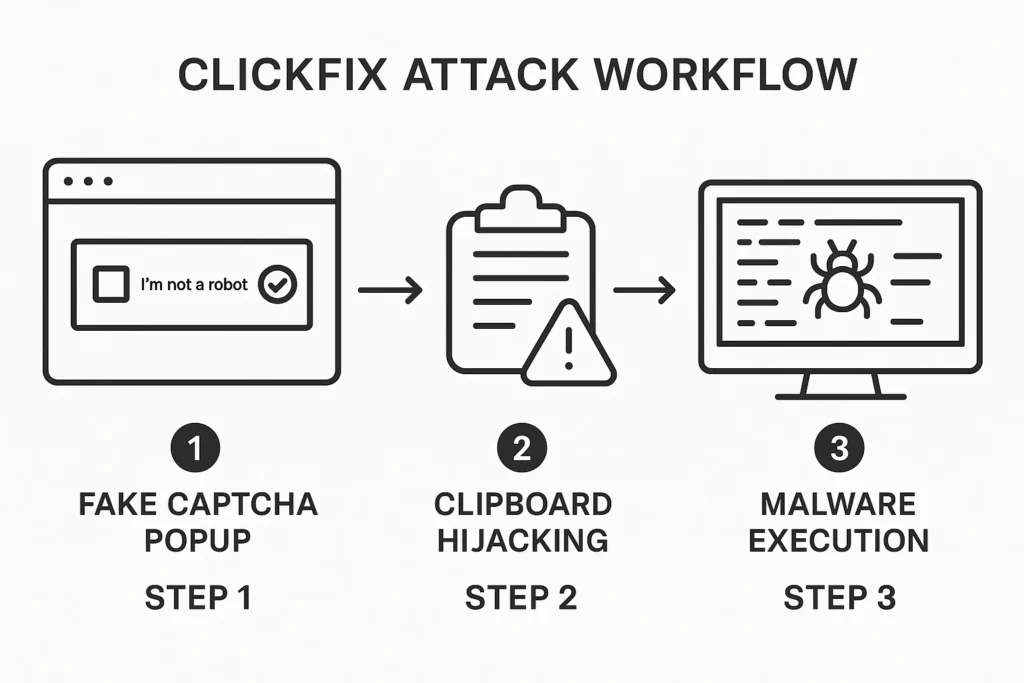
Step 1: The bait. You meet a fake error message, CAPTCHA, antivirus warning, update prompt or “network problem” notice. It usually claims your device has an issue or that you must prove you are not a bot.
Step 2: The hidden copy. This is the detail most people never notice. When you click a button like “I’m not a robot” or “Fix it,” the page quietly copies a malicious command to your clipboard in the background. You never see it happen.
Step 3: The instructions. The page now tells you to open the Windows Run box (Windows key + R), PowerShell, Command Prompt or Terminal, then paste (Ctrl+V) and press Enter. Some versions use other shortcuts, such as Windows key + X, to reach the same tools.
Step 4: You run it. Because you pressed Enter yourself, the command runs with your permission. Depending on the attacker, it can download malware, install spyware, steal saved passwords, harvest banking details, deploy ransomware or give the criminal remote control of your machine.
Step 5: The fallout. Once inside, attackers can reach your emails, banking apps, crypto wallets, work accounts and personal files.
One reassuring note from security researchers: simply seeing a fake CAPTCHA does not infect you. The attack only succeeds if you paste and run the command.
Where the Traps Are Hiding
ClickFix pages do not arrive in one neat package. People run into them in many places:
- Hacked or fake websites showing a bogus CAPTCHA, often copying the look of Google or Cloudflare checks
- Malicious ads and poisoned search results
- Phishing emails and even Word documents with “fix” instructions
- Fake job listings
- Fake meeting errors, for example a pretend Google Meet, Teams or Zoom problem
- Fake booking or reservation pages, which Microsoft has documented being used against the hospitality sector
Common lines you might see: “Verify you’re human,” “Update your browser,” “Fix DNS issue,” “Windows security warning,” “Your PC is infected,” “Enable copy-paste protection,” or “Network connectivity repair.” The wording changes. The giveaway never does: the page wants you to open a system tool and paste something.
Why ClickFix Slips Past Security Tools
Traditional attacks often depend on a malicious file landing on your device, and security software is good at spotting those. ClickFix takes a different road.
- The user starts the action. Your computer sees a person typing a command, not a suspicious program arriving uninvited.
- It uses trusted tools. PowerShell and similar utilities are built into Windows and are legitimate. Attackers simply abuse them.
- There is no obvious attachment for email filters to catch. In many cases the message is plain text.
To be fair, this does not make ClickFix invisible. Modern endpoint protection can catch many of the payloads, and companies can hunt for suspicious command behavior. But the method makes the first step much harder to block automatically, which is why awareness matters so much.
ClickFix by the Numbers: A Fast-Growing Threat
The figures explain why defenders are worried.
| Indicator | What researchers reported |
|---|---|
| Growth | ESET recorded a 517% rise in ClickFix-style fake CAPTCHA detections between the second half of 2024 and the first half of 2025 |
| Share of attacks | Nearly 8% of attacks blocked by ESET in that period, making it the second most common vector after phishing |
| Entry point | Microsoft’s 2025 Digital Defense Report put ClickFix at roughly 47% of initial-access cases seen by its Defender Experts team |
| Payloads | Information stealers, remote access tools, cryptominers and ransomware |
| Who uses it | Everyday cybercriminals, plus groups security researchers link to state-backed operations |
Microsoft also published a dedicated analysis in August 2025 titled “Think before you Click(Fix),” and warnings have kept coming. McMaster University in Canada reported a rise in ClickFix attacks in March 2026, Germany’s University of Münster issued an alert in May 2026, and national CERT teams such as Azerbaijan’s have flagged fake Google and Cloudflare verification pages spreading malware families like StealC and NetSupport. Reports also say the US Federal Trade Commission issued a consumer alert on fake CAPTCHA scams in June 2026.
It Is Not Just a Windows Problem
Windows users are the main target, but the trick travels.
- Mac users are shown a similar prompt, only the pasted command goes into Terminal. Mac-focused versions have been used to spread Atomic Stealer.
- FileFix is a 2025 spin-off that asks you to paste text into the File Explorer address bar rather than the Run box.
- New variants keep appearing, including ones that abuse DNS lookups. Attackers also use AI tools to build convincing fake pages faster and more cheaply.
- Browsers are starting to respond. Opera, for example, has introduced a “Paste Protect” feature aimed at this kind of attack.
The lesson is simple: the tool you are asked to open may change, but the request to paste a command from a web page never does.
The Golden Warning Signs
Stop immediately if any page, email or document asks you to:
- Press Windows + R or open Run
- Open PowerShell, Command Prompt or Terminal
- Paste something you did not write yourself
- Run a script or an odd-looking code string
- Disable your antivirus before continuing
- Prove you are human by doing anything other than a normal CAPTCHA
A real CAPTCHA never needs you to paste commands. Legitimate websites do not ask ordinary visitors to run code on their computers. Treat any request like this as an attack.
Do’s and Don’ts
Do
- Close the page the moment it asks you to open Run, PowerShell or Terminal.
- Go to the official source. If you genuinely worry about an issue, visit the company’s real website yourself instead of trusting a pop-up.
- Ask IT if you are on a work device.
- Keep Windows, your browser and security software updated.
- Check the web address carefully. Fake pages imitate Microsoft, Google, banks and government sites.
- Turn on multi-factor authentication (MFA), and prefer passkeys where you can.
Don’t
- Never copy and paste commands from a website you do not fully trust.
- Never run PowerShell commands suggested by a pop-up.
- Don’t be rushed. Attackers rely on urgency and panic.
- Don’t switch off your antivirus, no matter who asks.
- Don’t download “fix tools” from anywhere except the official vendor.
One honest caution on MFA: it helps, but it is not magic. Some malware steals logged-in session data, which can let a criminal get around a login prompt. That is why the recovery steps below include signing out of every session.
What to Do If You Already Ran the Command
Do not panic. Acting quickly limits the damage.
- Disconnect from the internet (Wi-Fi off or cable out) so the malware cannot send more data out or download extra tools.
- Use a different, clean device for the next steps, such as your phone or another computer. Do not use the infected machine to change passwords.
- Change your important passwords, starting with email, banking and any account that resets others. Then sign out of all active sessions and devices on those accounts.
- Turn on MFA for critical accounts if it is not already on.
- Call your bank if financial details may be exposed. Check crypto wallets, and move funds only from a clean device.
- Tell your IT team straight away if it was a work computer. Do not try to quietly fix it yourself.
- Run a full antivirus and anti-malware scan. If the infection is confirmed, or you cannot be sure the machine is clean, backing up essential files and reinstalling the operating system is the safest option.
- Report it. In India, you can file a complaint at cybercrime.gov.in or call the 1930 cybercrime helpline. Reporting helps investigators spot patterns and may help with recovery.
For Workplaces: Closing the Door on ClickFix
Security teams can reduce risk with a few practical steps:
- Restrict or disable the Run dialog and limit PowerShell for users who do not need it.
- Use endpoint protection that watches for unusual commands launched from a user’s session.
- Train staff on this specific trick, with real screenshots of fake CAPTCHAs, rather than generic phishing talks alone.
- Make it easy and blame-free to report mistakes. Fast reporting often decides whether an incident stays small.
Quick Answers: ClickFix FAQ
Is ClickFix a virus? Not by itself. It is a trick that gets you to run a command. That command may then install malware.
Can a fake CAPTCHA infect me just by loading? Generally no. The attack depends on you pasting and running the command.
Does antivirus stop ClickFix? Good security software can block many payloads, but it is not a guarantee, because you are the one starting the action. Caution comes first.
What is the safest rule to remember? If a website asks you to open Run, PowerShell, CMD or Terminal and paste something, do not do it.
The Bottom Line
ClickFix does not break your computer. It talks you into doing it. That makes it one of the most human-centred cyberattacks around, and also one of the easiest to defeat once you know the signal.
Remember one rule: a website should never ask you to run a command. Close the page, take a breath, and go to the official source. That single habit can prevent most ClickFix infections, and it costs you nothing.
Think you may have run a suspicious command? Disconnect from the internet first, then follow the recovery steps above from a clean device.
Follow Us on WhatsApp
Get Breaking News, Exclusive Updates & In-Depth Analysis from Kashmir and beyond, delivered straight to your phone.
Join our WhatsApp Channel: Follow Now